Best CI/CD Platforms for DevOps Teams: A Comprehensive Comparison

Best CI/CD Platforms for DevOps Teams: A Comprehensive Comparison

Aziro Marketing

|

09 Oct 2026

Introduction

The best CI/CD platform for a DevOps team is the one that fits its code hosting, cloud strategy, security needs and scale. There is no single winner. This guide compares six leading options to help you choose. CI/CD stands for continuous integration and continuous delivery (or deployment). It is the practice of automatically building, testing and releasing code every time a developer makes a change. Instead of bundling weeks of work into a risky release, teams ship small, verified changes many times a day.

CI/CD has become central to modern DevOps. According to the CD Foundation's State of CI/CD Report 2024, 83% of developers are involved in DevOps-related activities, and CI/CD tool usage is associated with better deployment performance across all DORA metrics. AI is raising the stakes further. Google's 2025 DORA report found that 90% of software professionals now use AI at work, a 14% increase from the previous year. More code, written faster, needs pipelines that can test and ship it safely.

When evaluating a CI/CD platform, organizations should look at pipeline automation, Git integration, testing and deployment features, Kubernetes and cloud support, built-in security, scalability, hosting model, developer experience, enterprise integrations and total cost.

This guide compares six of the most widely used platforms:

  • GitHub Actions: CI/CD built directly into GitHub
  • GitLab CI/CD: part of GitLab's single DevSecOps platform
  • Jenkins: the open-source, plugin-driven automation server
  • Azure DevOps: Microsoft's end-to-end DevOps suite
  • CircleCI: a cloud-first CI/CD service known for speed
  • Bitbucket Pipelines: CI/CD built into Atlassian's Bitbucket Cloud
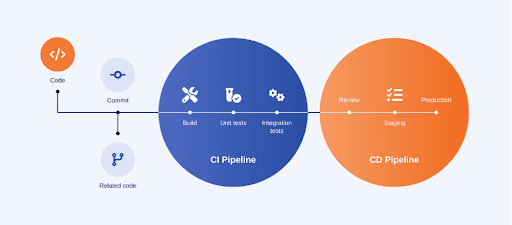
What Is a CI/CD Platform?

What Is a CICD Platform.png

A CI/CD platform is software that automates the path from a code commit to a running application. It watches your repository, runs a defined pipeline on every change, and reports whether the change is safe to ship. Most platforms cover six core functions.

Continuous Integration (CI). Developers merge code into a shared branch frequently, often several times a day. Each merge triggers an automated build and test run, so integration problems surface within minutes instead of at the end of a sprint.

Continuous Delivery. Every change that passes the pipeline is automatically packaged and kept in a releasable state. A person still approves the final push to production, but the release itself is a routine, one-click step.

Continuous Deployment. This goes one step further. Every change that passes all automated checks is released to production with no manual approval. It requires strong test coverage and monitoring, and it is how high-performing teams deploy many times a day.

Automated testing. Unit, integration, end-to-end, performance and security tests run inside the pipeline. Automated testing is the safety net that makes frequent releases possible.

Deployment automation. The platform deploys builds to development, staging and production environments, whether those are virtual machines, containers, Kubernetes clusters or serverless functions. Strategies like blue-green, canary and rolling deployments reduce the risk of each release.

Monitoring and feedback. Pipelines report build status, test results and deployment health back to developers, often in their pull requests and chat tools. Fast feedback lets teams fix problems while the change is still fresh in their minds.

What Should You Look for in a CI/CD Platform?

The right platform balances automation power, security and cost against your team's existing tools and skills. Use these 11 criteria to evaluate your options.

  1. Pipeline automation: Look for pipelines defined as code (usually YAML) that are versioned with your application. Support for parallel jobs, matrix builds, caching and reusable templates keeps pipelines fast and maintainable.
  2. Integration with Git repositories: The platform should trigger on commits, pull requests, merge requests and tags, and report results back into code reviews. Native integration with your Git host removes setup overhead.
  3. Automated testing: Check support for running unit, integration and end-to-end tests in parallel, splitting slow test suites, and surfacing flaky tests and coverage reports.
  4. Deployment capabilities: Environments, approval gates, secrets per environment and deployment strategies such as blue-green and canary releases are essential for safe production delivery.
  5. Cloud and Kubernetes support: Native integrations with AWS, Azure and Google Cloud, container builds and Kubernetes deployments (including GitOps tools such as Argo CD and Flux) are now baseline requirements.
  6. Security and DevSecOps: Pipelines hold your most sensitive credentials. Look for built-in secret management, static and dependency scanning, signed artifacts and fine-grained permissions. The March 2025 compromise of the popular tj-actions/changed-files GitHub Action, used in more than 23,000 repositories, exposed CI/CD secrets in build logs and showed how much supply chain risk sits inside pipelines.
  7. Scalability: The platform must handle growing numbers of builds, repositories and contributors through autoscaling runners, concurrency controls and fast queue times.
  8. Self-hosted vs. SaaS: SaaS platforms remove infrastructure maintenance. Self-hosted options give you control over data residency, network access and compliance. Many teams use a hybrid of both, which the CD Foundation links to the best deployment performance.
  9. Developer experience: Clear logs, fast feedback, local debugging, good documentation and a gentle learning curve directly affect adoption and productivity.
  10. Enterprise integrations: Single sign-on, audit logs, role-based access, compliance reporting and integrations with issue trackers, chat tools and observability platforms matter at enterprise scale.
  11. Cost: Compare pricing per user, per build minute or per credit, plus the hidden costs of maintaining self-hosted infrastructure, plugins and the engineering time needed to run the platform. 

Top CI/CD Platforms for DevOps Teams

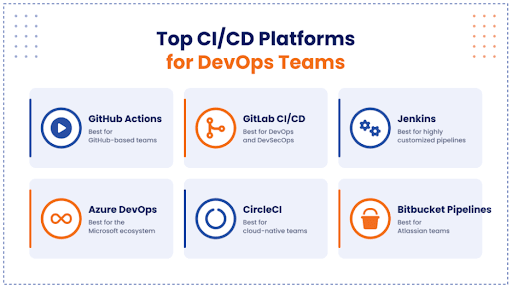
These six platforms cover the vast majority of CI/CD use in modern DevOps teams. Each has a clear sweet spot, and the right pick depends on where your code lives and how you deploy.
Top CICD Platforms for DevOps Teams.png

1. GitHub Actions

GitHub Actions is the CI/CD engine built into GitHub, the world's largest code platform. GitHub's Octoverse 2025 reports more than 180 million developers on the platform, merging 43.2 million pull requests a month, a 23% increase year over year.

Key features

  • YAML workflows triggered by any GitHub event, from pushes and pull requests to issues and releases
  • A marketplace of thousands of reusable, community-built actions
  • GitHub-hosted runners for Linux, Windows and macOS, plus self-hosted runners and the Actions Runner Controller for Kubernetes
  • Matrix builds, reusable workflows, environments with approval rules, and OIDC for secretless cloud deployments

Strengths

  • Zero setup for teams already on GitHub, with results shown directly in pull requests
  • Huge ecosystem and community knowledge base
  • Lower hosted-runner costs in 2026: GitHub cut hosted-runner prices by up to 39% from January 1, 2026

Limitations

  • Tightly tied to GitHub, so it is a weaker fit for code hosted elsewhere
  • Third-party actions add supply chain risk, as the tj-actions incident showed; pinning actions to commit SHAs is now best practice
  • Pricing uncertainty for self-hosted runners: GitHub announced a $0.002-per-minute platform charge for self-hosted runners in December 2025, then postponed it after developer backlash to re-evaluate its approach

Best suited for: Teams of any size whose code already lives on GitHub and who want fast, integrated CI/CD with minimal overhead.

2. GitLab CI/CD

GitLab CI/CD is part of GitLab's single DevSecOps platform, combining source control, CI/CD, security scanning and planning in one application. In January 2026, GitLab made its Duo Agent Platform generally available with GitLab 18.8, adding AI agents that can explain, configure and troubleshoot pipelines.

Key features

  • .gitlab-ci.yml pipelines with stages, parent-child pipelines, merge request pipelines and merge trains
  • Built-in SAST, DAST, dependency, container and secret scanning in higher tiers
  • Auto DevOps, environments, review apps and native Kubernetes agent integration
  • AI flows that convert Jenkins pipelines to GitLab CI/CD and fix failed pipelines

Strengths

  • One platform for the entire software lifecycle, reducing tool sprawl
  • Strong DevSecOps capabilities built into the pipeline
  • Flexible deployment: GitLab.com SaaS, self-managed or single-tenant GitLab Dedicated

Limitations

  • Advanced security and compliance features require the premium tiers
  • Self-managed instances require ongoing administration and upgrades
  • The breadth of features can mean a steeper learning curve

Best suited for: Organizations that want an all-in-one DevSecOps platform, especially those in regulated industries that need self-hosting.  

3. Jenkins

Jenkins is the original open-source automation server and still one of the most widely deployed CI/CD tools. Its community maintains over 2,000 plugins, covering almost any tool, language or deployment target.

Key features

  • Declarative and scripted pipelines defined in a Jenkinsfile
  • More than 2,000 plugins for SCMs, build tools, cloud providers and notifications
  • Distributed builds across agents, including dynamic Kubernetes agents
  • Configuration as Code for reproducible Jenkins setups

Strengths

  • Free, open source and endlessly customizable
  • Runs anywhere, including fully air-gapped environments
  • Mature, battle-tested and backed by a large community

Limitations

  • High maintenance overhead: servers, plugins and security patches must be managed by your team
  • Plugin compatibility issues and "plugin sprawl" can make upgrades risky
  • A dated user interface and slower developer experience compared with newer SaaS tools

Best suited for: Teams with complex, highly customized pipelines, legacy systems or strict on-premises requirements, and the engineering capacity to maintain them.

4. Azure DevOps

Azure DevOps is Microsoft's end-to-end DevOps suite, combining Azure Pipelines with Boards, Repos, Test Plans and Artifacts. It is available as a cloud service and as on-premises Azure DevOps Server.

Key features

  • Azure Pipelines with YAML or classic pipelines, multi-stage releases and environment approvals
  • Microsoft-hosted agents for Linux, Windows and macOS, plus self-hosted agents
  • Deep integration with Azure, Microsoft Entra ID and Visual Studio
  • Works with code in Azure Repos, GitHub or other Git providers

Strengths

Limitations

  • Extra parallel jobs cost $40 per month for Microsoft-hosted and $15 per month for self-hosted agents
  • Microsoft's innovation focus has shifted toward GitHub, so new features arrive more slowly
  • The interface and YAML syntax can feel complex for smaller teams

Best suited for: Enterprises invested in the Microsoft ecosystem, especially Azure, .NET and Windows workloads. 

5. CircleCI

CircleCI is a cloud-first CI/CD platform known for fast builds and strong performance insights. Its 2026 State of Software Delivery report analyzed more than 28 million workflows and found daily workflow runs grew 59% year over year, while main branch success rates fell to 70.8%, the lowest in over five years.

Key features

  • YAML configuration with reusable packages called orbs
  • Docker, Linux, Windows, macOS, Arm and GPU execution environments
  • Intelligent test splitting, parallelism and advanced caching
  • Insights dashboards for build duration, flaky tests and success rates

Strengths

  • Excellent build speed and performance optimization
  • Works with both GitHub and Bitbucket repositories
  • Strong support for mobile and multi-platform builds

Limitations

  • Credit-based pricing can become expensive and hard to predict at scale
  • Self-hosted runners are available, but the control plane remains SaaS-first
  • Fewer built-in security and planning features than all-in-one platforms

Best suited for: Cloud-native teams that prioritize build speed, test optimization and detailed pipeline analytics.

6. Bitbucket Pipelines

Bitbucket Pipelines is the CI/CD service built into Atlassian's Bitbucket Cloud, with tight links to Jira and Confluence. In 2026, Atlassian kept a free tier of up to 100 self-hosted runners and introduced a paid Premium Runners tier after customer pushback on an earlier plan to charge for all self-hosted runners.

Key features

  • bitbucket-pipelines.yml configuration with Docker-based builds
  • Pipes: prebuilt integrations for deploying to AWS, Azure, Google Cloud and more
  • Deployment environments with permissions and tracking
  • Native Jira integration that links commits, builds and deployments to issues

Strengths

  • Simple setup for teams already using Bitbucket and Jira
  • End-to-end traceability from Jira issue to production deployment
  • Self-hosted runners for compliance-sensitive workloads

Limitations

  • Only available with Bitbucket Cloud
  • Limited included build minutes on lower plans, with extra minutes bought in packs
  • No macOS cloud runners, so iOS builds require self-hosted Apple hardware

Best suited for: Small to mid-sized teams standardized on the Atlassian stack who want CI/CD that works out of the box.  

CI/CD Platform Comparison

All six platforms support cloud usage, Kubernetes deployments and enterprise teams. The biggest differences are their natural ecosystem and whether the platform itself can be fully self-hosted.

ifferences are their natural ecosystem and whether the platform itself can be fully self-hosted. 

Platform 

Best For 

Cloud 

Self-Hosted 

Kubernetes 

Enterprise 

 GitHub Actions 

 GitHub-based teams 

✓ 

— 

✓ 

✓ 

 GitLab CI/CD 

 DevOps/DevSecOps 

✓ 

✓ 

✓ 

✓ 

 Jenkins 

 Highly customized  pipelines 

✓ 

✓ 

✓ 

✓ 

 Azure DevOps 

 Microsoft ecosystem 

✓ 

✓ 

✓ 

✓ 

 CircleCI 

 Cloud-native teams 

✓ 

— 

✓ 

✓ 

 Bitbucket  Pipelines 

 Atlassian teams 

✓ 

— 

✓ 

✓ 

"Self-Hosted" refers to running the full platform on your own infrastructure. GitHub Actions, CircleCI and Bitbucket Pipelines all support self-hosted runners, even though their control planes are SaaS. 

Which CI/CD Platform Is Best for Your DevOps Team?

The best choice usually follows your code host and cloud provider. Here is how the platforms map to common use cases.

Best for GitHub users: GitHub Actions. If your repositories already live on GitHub, Actions offers the fastest path to CI/CD, with no extra accounts, native pull request checks and a vast marketplace of reusable actions.

Best for enterprise DevOps: GitLab CI/CD or Azure DevOps. GitLab suits enterprises that want one platform across planning, code, security and delivery. Azure DevOps suits enterprises that need mature governance, work tracking and on-premises options within a Microsoft environment.

Best for highly customized pipelines: Jenkins. When pipelines must integrate with legacy systems, unusual toolchains or air-gapped networks, Jenkins's plugin ecosystem and scripting flexibility are hard to beat.

Best for DevSecOps: GitLab CI/CD. Built-in SAST, DAST, dependency, container and secret scanning, along with AI security agents, make GitLab the most security-integrated option out of the box.

Best for Microsoft environments: Azure DevOps. Native integration with Azure, Entra ID, Visual Studio and .NET makes Azure DevOps the natural fit for Microsoft-centric teams.

Best for cloud-native development: CircleCI or GitHub Actions. CircleCI excels at fast, containerized builds with deep test optimization. GitHub Actions offers strong Kubernetes and cloud integrations with OIDC-based deployments to AWS, Azure and Google Cloud.

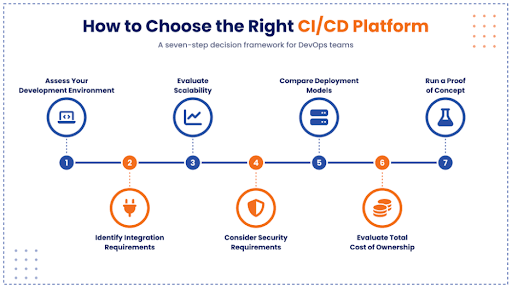
How to Choose the Right CI/CD Platform

How to Choose the Right CICD Platform.png

A structured, seven-step evaluation reduces the risk of picking a platform you outgrow or later need to migrate away from.

  1. Assess your development environment. Map where your code is hosted, which languages and frameworks you use, and where applications run, whether that is on-premises, a single cloud, multi-cloud or Kubernetes.
  2. Identify integration requirements. List the tools your pipeline must connect to, such as issue trackers, artifact repositories, security scanners, observability tools, chat platforms and cloud accounts.
  3. Evaluate scalability. Estimate build volume today and in two to three years. Check concurrency limits, runner autoscaling and queue times under peak load. CircleCI's data showing a 59% jump in daily workflow runs in a single year is a reminder that AI-assisted coding can multiply pipeline demand quickly.
  4. Consider security requirements. Review secrets management, access controls, audit logs, artifact signing, built-in scanning and support for compliance frameworks your industry requires.
  5. Compare deployment models. Decide between SaaS, self-hosted or hybrid. Weigh data residency, network access to internal systems and the operational effort of running your own infrastructure.
  6. Evaluate total cost of ownership. Look beyond list prices to build minutes, parallel jobs, storage, self-hosted infrastructure, plugin maintenance and the engineering hours needed to run the platform. Recent pricing shifts at GitHub and Atlassian show that self-hosted runner costs can change, so model a few scenarios.
  7. Run a proof of concept. Migrate two or three representative services, measure build time, failure rates, developer feedback and operational effort, then decide based on real data rather than feature lists. 

The Future of CI/CD and DevOps

CI/CD is shifting from scripted automation to intelligent, policy-driven delivery platforms. Seven trends are shaping what DevOps teams should expect next.

AI-assisted DevOps. AI is now writing more code and helping fix pipelines. Google's 2025 DORA report found AI adoption among software professionals reached 90%, and linked it to higher delivery throughput. But CircleCI's main branch success rate falling to 70.8% shows that faster code generation increases pressure on testing and delivery. Expect more AI agents that diagnose failed builds and suggest fixes, like GitLab's Fix CI/CD Pipeline flow.

GitOps. Teams increasingly declare desired system state in Git and let tools like Argo CD and Flux reconcile clusters automatically. This makes every change auditable and easy to roll back.

DevSecOps. Supply chain attacks have made pipeline security a board-level concern. Expect wider adoption of signed artifacts, software bills of materials (SBOMs), pinned dependencies and secretless authentication with OIDC.

Kubernetes. Kubernetes has become the default deployment target for cloud-native applications, and CI/CD platforms now run builds on ephemeral, autoscaling Kubernetes runners.

Infrastructure as Code. Tools like Terraform, OpenTofu and Pulumi bring infrastructure into the same review and pipeline process as application code, with policy-as-code checks before every change.

Continuous deployment. With better automated testing, feature flags and progressive delivery, more teams are moving from manual release approvals to fully automated deployments to production.

Platform engineering. Gartner predicts that by 2026, 80% of large software engineering organizations will establish platform engineering teams to provide reusable services, components and tools for application delivery. CI/CD increasingly becomes a "golden path" offered by internal developer platforms. 

Conclusion

There is no universal "best" CI/CD platform. GitHub Actions is the natural choice for GitHub-centric teams, GitLab CI/CD leads for integrated DevSecOps, Jenkins remains unmatched for deep customization, Azure DevOps fits Microsoft environments, CircleCI excels at speed for cloud-native teams, and Bitbucket Pipelines serves Atlassian users well.

The right choice depends on your organization's technology stack, scale, security requirements and deployment model. Start with where your code lives, define your must-have integrations and security controls, model the total cost, and validate your shortlist with a real proof of concept.

Looking to modernize your software delivery lifecycle? Aziro helps organizations build scalable, secure and automated software engineering environments aligned with modern DevOps practices, from CI/CD pipeline design and cloud migration to DevSecOps and platform engineering. Talk to our DevOps experts to find the right path for your team.  

Real People, Real Replies.

That's how it usually goes, you reach out with a question or a rough idea, a real person at Aziro responds, and a conversation turns into something big.
Start yours with us.

Phone

Talk to us

+1 227 232 3176

Email

Drop us a line at

info@aziro.com

Got a Tech Challenge? Let’s Talk

Country code

Got a Tech Challenge? Let’s Talk

Country code
Best CI/CD Platforms for DevOps Teams: 6 Tools Compared